
The danger of forgotten tools
Home » Security » The danger of forgotten tools
Sometimes the biggest threat is already on your network without you even realizing it. Not new malware, not a targeted attack, but something that once seemed useful and then just… stayed there. An old tool. A piece of test software. A plug-in that everyone has forgotten the name of.
These unused applications are the perfect entry point for attackers. While you add new solutions, that one old service continues to run in the background. Without updates. And that is exactly what makes it so vulnerable to a cyberattack.
Invisible holes in your defense
You often only notice outdated software when things go wrong. In many organizations, things tend to stick around, such as:
- Old software versions
- Forgotten security tools
- Test environments that have never been cleaned up
- Plug-ins in browsers or servers that no one monitors
These components no longer receive patches and become attractive targets for attackers.
Why this often goes wrong
It happens because your IT environment grows. Project after project. Tool after tool. Until no one knows exactly what is running anymore. And what you don’t see, you can’t protect.
An asset inventory helps with this. Not as extra administration, but as the foundation of a secure environment. You get an up-to-date overview of all systems, applications, and services in your environment. What is active. What has been forgotten. And what should actually be removed. Only when that overview is accurate can you see where the real risks lie. This is also an important part of NIS2. So you’re off to a good start.
Three ways to regain control:
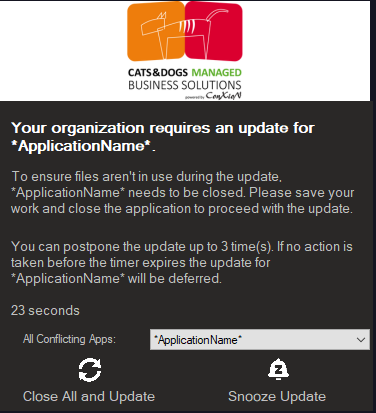
- Automatic patches
Tools such as PatchMyPC or built-in update mechanisms ensure that every application remains up to date automatically. You avoid forgotten software and close vulnerabilities before attackers can exploit them.
2. An approval procedure for new tools
Many risks arise not from what you forget to remove, but from what has been added at some point. A plug-in. A handy tool. A quick test solution.
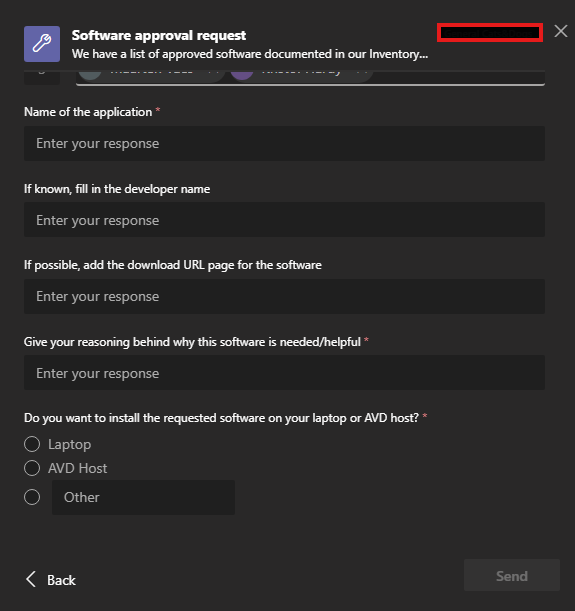
An approval procedure deliberately slows down that process. Every new application or plug-in first undergoes a manual check:
– Does this fit within your IT architecture?
– Is support and maintenance provided?
– What does this mean for your security?
This manual step is important. Not everything can or should be done automatically. That is precisely why this is also an explicit pillar within NIS2: demonstrating that you consciously decide what gets access to your environment.
Do you work with Microsoft Teams? Then you can set up free approval flows to keep this process clear, traceable, and achievable. You can choose the people who are responsible for approving this procedure. This is often the management, an IT manager, and the DPO of your organization.
- Detecting vulnerabilities with Microsoft Defender
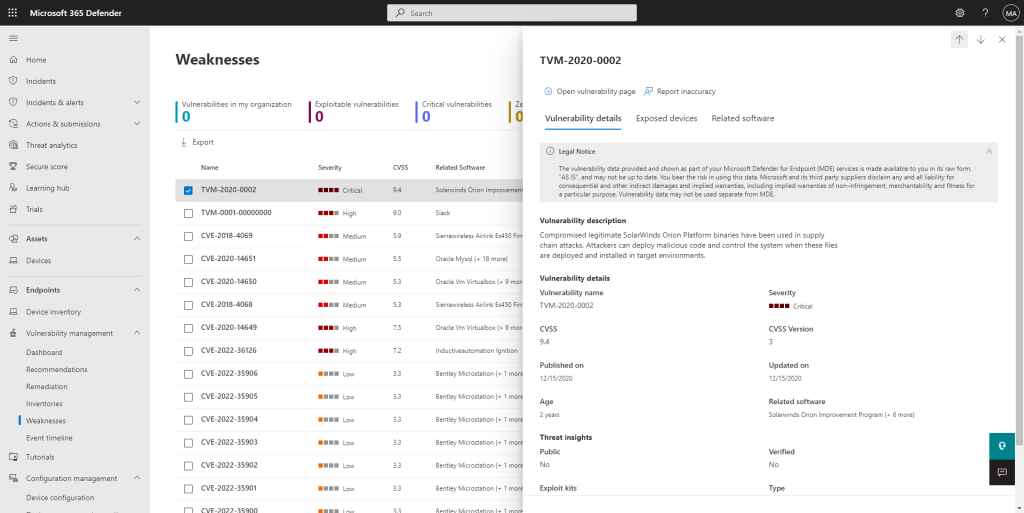
Microsoft Defender and the built-in Threat & Vulnerability Management module scan your entire environment. You can immediately see which software is vulnerable, which versions pose a risk, and where old components are still running.
Less is more
Tidying up is a form of defense. The fewer loose components, the fewer risks. And the smaller the chance that an open window will be left somewhere.
Want to map out your IT environment?
We are happy to help you. Feel free to schedule a no-obligation consultation with our specialists.
Schedule a meeting